To test solar panel output, you need to measure its open-circuit voltage (Voc) and short-circuit current (Isc) using a digital multimeter, and then compare these field readings to the manufacturer’s rated specifications. First, ensure the panel is exposed to direct, unshaded sunlight. Next, connect the multimeter’s probes directly to the panel’s positive and negative terminals to read the voltage and current, allowing you to calculate the actual wattage and determine if the panel is performing optimally.
Testing solar panel output is the only definitive way to verify that your solar array is generating the power you paid for. Routine performance verification allows you to catch underperforming modules, detect early electrical faults before they cause system-wide failures, document warranty claims with empirical data, and ultimately maximize your return on investment. Whether you are investigating a solar panel not producing enough power or simply conducting annual solar panel maintenance, accurate diagnostic testing separates easily fixable issues from expensive hardware failures.
Understanding Solar Panel Specifications
Before you pick up a digital multimeter, you must understand the language of solar photovoltaics. Every solar module has a specification label—often called a nameplate—adhered to the back of the panel. This datasheet contains the exact baseline numbers you need to verify performance.
- Open-Circuit Voltage (Voc): The maximum voltage the panel produces when it is exposed to sunlight but disconnected from any load, charge controller, or inverter.
- Short-Circuit Current (Isc): The maximum amperage the panel produces when the positive and negative terminals are connected directly to one another without an external load.
- Vmp and Imp: Voltage at maximum power (Vmp) and current at maximum power (Imp) represent the electrical operating conditions when the panel is actively powering a load at its absolute peak efficiency.
- Maximum Power (Pmax): The total rated wattage of the panel under ideal conditions. This is calculated by multiplying Vmp by Imp.
- Standard Test Conditions (STC): The laboratory benchmark used to rate panels. STC is defined as 1,000 watts per square meter of sunlight (irradiance) hitting a panel with a cell temperature of 25°C (77°F) and an air mass of 1.5.
- Real-World Conditions: Panels rarely operate at STC in the field. In direct summer sunlight, solar cells get much hotter than 25°C, and solar irradiance constantly fluctuates based on cloud cover, the season, and the time of day.
- Solar Irradiance: The density of sunlight hitting the panel, measured in watts per square meter (W/m²).
- Temperature Coefficient: A percentage that explains how much power a panel loses for every degree the cell temperature rises above 25°C. Heat increases internal resistance, which lowers voltage, thereby reducing total panel output.
Related Article: Cost of Installing Solar Panels at Home.
Safety First: Working with Live DC Electricity
Testing solar arrays involves live direct current (DC) electricity. Unlike alternating current (AC) in your home, DC arcs do not easily self-extinguish. A DC arc can cause severe burns, start a fire, or result in fatal shocks.
Always wear appropriate Personal Protective Equipment (PPE), including electrically insulated gloves rated for your system’s maximum voltage and protective safety glasses. Never disconnect MC4 connectors while the system is under load (actively producing and sending power to an inverter); doing so will immediately draw a dangerous DC arc. Before working on the wiring, always turn off the DC disconnect switch at the inverter and disconnect the battery bank.
If you are testing a single, uninstalled panel, lay it face down on the grass or cover it with a heavy, opaque tarp to stop power generation while you connect your testing probes. Never test solar equipment in wet conditions, rain, or high winds.
If you are dealing with grid-tied roof arrays, complex series strings where voltages exceed 50V DC, or if you suspect damaged wiring, do not attempt to test the system yourself. Call a licensed solar professional or electrician. All electrical work should comply with local regulations and the National Electrical Code (NEC).
Step-by-Step Methods to Test Solar Panel Output
There are several ways to measure solar panel output, ranging from basic DIY checks to advanced professional diagnostics. Here is how to perform the most critical tests.
1. Testing Voltage with a Digital Multimeter (Voc)
A solar panel voltage test is the easiest way to determine if a panel has continuity and is capable of producing power.
Tools Required: A digital multimeter rated for at least 600V DC (1000V DC preferred) and the panel being tested.
Procedure:
- Angle the solar panel so it faces the sun directly.
- Set your digital multimeter dial to the DC Voltage setting (often indicated by a “V” with a solid line and a dashed line above it).
- Locate the two cables coming from the panel’s junction box.
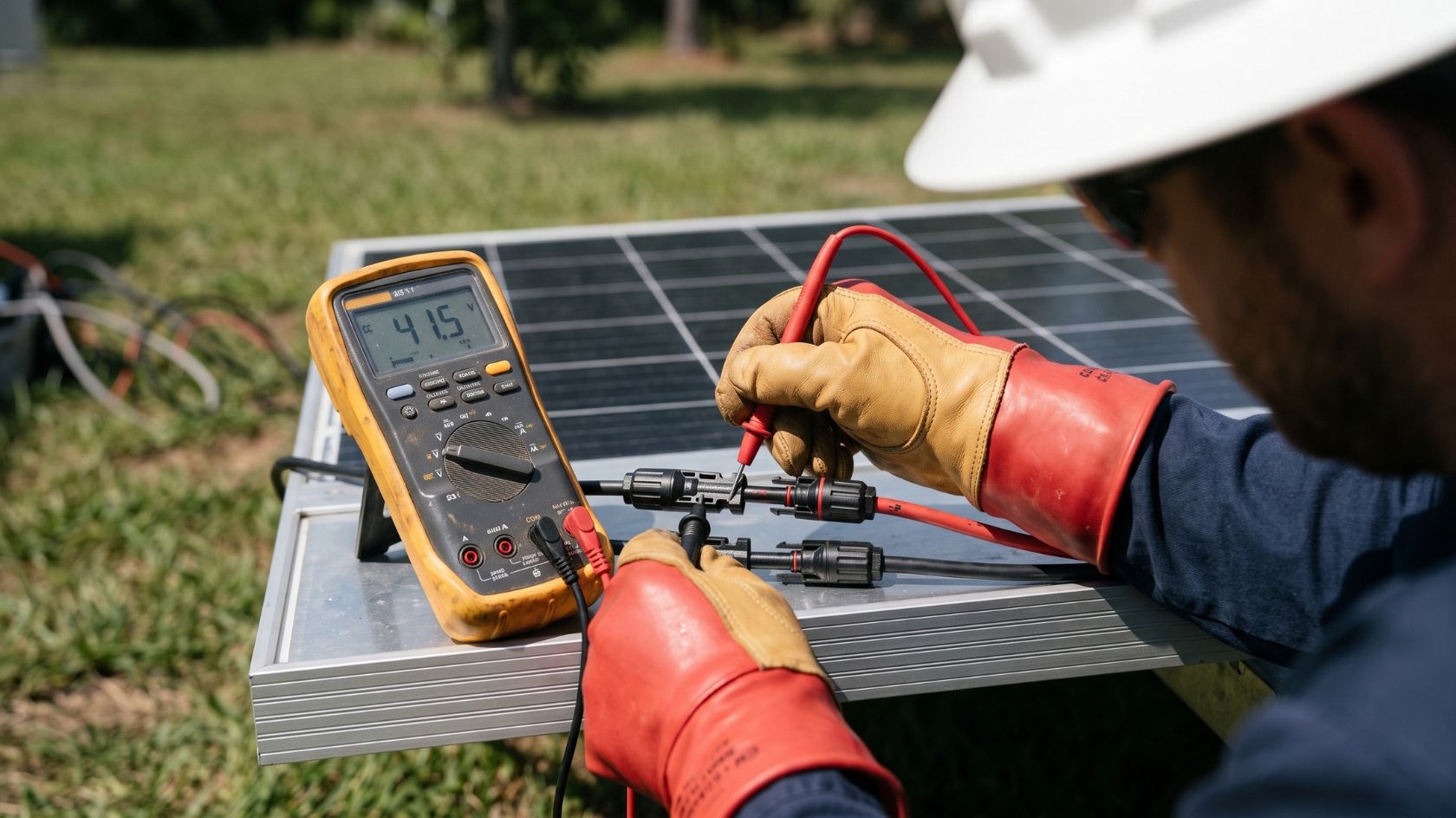
- Connect the red multimeter probe to the panel’s positive MC4 connector. Connect the black probe to the negative MC4 connector.
Visual guide: The multimeter screen should instantly display a number, while the two probes are securely touched to the metal pins inside the plastic MC4 connector housings.
Expected Results: The multimeter should display a voltage reading very close to the Voc listed on the back of the panel.
Common Mistakes: Testing the panel while it is connected to a charge controller. To test Voc, the panel must be completely disconnected from the rest of the system.
2. Testing Current with a Clamp Meter or Multimeter (Isc)
Measuring the short-circuit current tells you if the panel can actually push power, not just hold a voltage.
Tools Required: A DC-rated clamp meter (highly recommended) or a standard digital multimeter.
Procedure (Using a Clamp Meter):
- Connect the panel’s positive MC4 cable directly into its own negative MC4 cable, creating a short circuit. (Only do this on a single panel, never a string).
- Set the clamp meter to measure DC Amps.
- Clamp the jaws of the meter around either the positive or negative cable.
Procedure (Using a Multimeter – Only for panels under 10 Amps):
- Move the red probe on your multimeter to the 10A port. Set the dial to DC Amps.
- Touch the red probe to the positive MC4 connector and the black probe to the negative MC4 connector.
Expected Results: In full sun, the reading should be relatively close to the Isc number on the panel’s nameplate.
Common Mistakes: Using a standard multimeter to test a modern, high-wattage panel. Most multimeters have a maximum fuse limit of 10 Amps. Today’s 400W+ panels often produce 11 to 14 Amps of short-circuit current. Testing these with a standard multimeter will blow the tool’s internal fuse. Always use a DC clamp meter for high-wattage panels.
3. Calculating Actual Wattage Output
Once you have verified the voltage and the current, you can perform a solar panel wattage test to find the actual power output.
- Tools Required: Multimeter and a calculator.
- Procedure: Multiply your measured operating voltage (not Voc, but the voltage while under load) by your measured operating current (Amps). Formula: Volts × Amps = Watts
- Expected Results: In real-world conditions, expect a panel to produce roughly 75% to 85% of its rated maximum power (Pmax).
- Common Mistakes: Multiplying Voc and Isc together to find wattage. Because Voc is measured with zero current flow, and Isc is measured with near-zero voltage, they never happen at the same time. You must measure voltage and current while the panel is actively connected to a load to calculate true wattage.
4. Accounting for Solar Irradiance and Temperature
To know if your field readings are truly accurate, you must factor in the current weather conditions.
- Tools Required: Solar irradiance meter and an infrared thermometer.
- Procedure: Hold the irradiance meter at the exact same angle as the solar panel to measure the intensity of the sun in W/m². Next, use the infrared thermometer to measure the temperature of the panel’s surface.
- Expected Results: If the sun is only providing 800 W/m² (80% of STC), your panel’s output will drop by roughly 20%. If the panel is 45°C (20 degrees above STC), you must subtract the temperature coefficient loss (e.g., 20 degrees × 0.35% loss per degree = 7% total power loss).
- Common Mistakes: Assuming a panel is failing when it is actually just a hot, slightly hazy day.
5. Using an IV Curve Tracer (Advanced)
For commercial arrays or deep diagnostics, professionals use an IV (Current-Voltage) curve tracer.
- Tools Required: IV Curve Tracer.
- Procedure: The tool is plugged into the panel’s MC4 connectors. It sweeps the electrical load from zero to maximum in milliseconds, plotting the exact voltage and current relationship on a graph.
- Expected Results: A healthy panel produces a smooth, knee-shaped curve.
- Common Mistakes: This is a highly specialized, expensive tool. DIYers should not attempt to buy or use IV curve tracers for basic solar inverter troubleshooting.
6. Using Inverter or Monitoring System Data
If you have a grid-tied system, your inverter software is your first line of defense.
- Tools Required: Wi-Fi connected inverter app (e.g., Enphase, SolarEdge, or SMA portal).
- Procedure: Log into the portal on a clear day at noon and check the per-panel output.
- Expected Results: All unshaded panels on the same roof plane should report nearly identical power generation within a 2-3% margin of error.
- Common Mistakes: Failing to account for different roof angles. A panel facing east will naturally produce different noon-time data than a panel facing south.
Interpreting Your Results
Once you have your numbers, you need to understand what they mean.
Acceptable Performance Ranges
It is a common misconception that a 400W solar panel will pump out exactly 400W all day long. Because STC represents laboratory conditions, a healthy solar panel will typically output between 75% and 85% of its rated capacity on a clear, sunny day. If your 400W panel is generating 320W at noon, it is performing perfectly. If it is only producing 150W in direct, cloudless sunlight, you have a problem.
Causes of Underperformance
If your solar panel is not producing enough power, investigate these common culprits:
- Shading: Even a small shadow from a vent pipe, chimney, or tree branch falling across a single cell can choke the output of the entire panel.
- Soiling: Heavy dust, pollen, bird droppings, or ash can reduce panel efficiency by 5% to 15%.
- Degradation: Solar panels naturally degrade by about 0.5% per year. A 10-year-old panel will produce roughly 5% less power than it did when new.
- Hotspots: Microcracks in the silicon or failed solder joints cause localized heat buildup, dragging down performance and potentially damaging the panel.
- Wiring and Connector Faults: Corroded MC4 connectors, pinched wires, or water ingress add electrical resistance, dropping your voltage.
- Bypass Diode Failure: Diodes allow power to flow around shaded sections of a panel. If a diode burns out due to a lightning strike or power surge, the panel’s output will drop by exactly one-third (33%) or two-thirds (66%).
- Temperature: Remember that solar panels lose efficiency as they heat up. Panels perform better on a crisp, clear winter day than they do during a sweltering summer heatwave.
How to Improve Solar Panel Efficiency After Testing
If your testing reveals suboptimal performance, you can take immediate action to restore your system’s efficiency.
- Implement a Cleaning Routine: If dirt is the culprit, schedule routine solar panel cleaning. Use a soft brush, a squeegee, and deionized water. Never use abrasive soaps or high-pressure washers, which can strip the anti-reflective coating off the glass.
- Shade Management: Trim back overhanging branches that have grown since the system was installed.
- Check Wiring and Connections: Inspect all visible MC4 connectors. If you see signs of melting, browning, or corrosion, the connector must be cut off and re-crimped by a professional.
- Upgrade to Optimizers or Microinverters: If shading is unavoidable, consider upgrading a traditional string inverter system with DC power optimizers or microinverters. These devices ensure that one shaded panel does not pull down the output of the entire array.
- Adjust Tilt and Orientation: For off-grid or ground-mounted systems, manually adjust the tilt of your panels twice a year to capture the lower winter sun and the higher summer sun.
- Professional Inspection: If you identify a panel with a blown bypass diode, severe hotspots, or internal delamination, it cannot be repaired in the field. Contact the manufacturer to process a warranty claim and hire a professional to replace it.
As a best practice, you should monitor your inverter data weekly and perform a physical multimeter test on off-grid or battery-based systems at least once a year.
Testing Methods Comparison Table
| Method | Tool Required | Skill Level | Cost Range | Accuracy | Best Use Case |
|---|---|---|---|---|---|
| Basic Voltage Check | Digital Multimeter | Beginner | $20 – $50 | Moderate | Checking if a single panel is completely dead or alive. |
| Short-Circuit Current | DC Clamp Meter | Intermediate | $50 – $150 | High | Verifying if a panel can push its rated amperage. |
| Irradiance Factoring | Irradiance Meter / Temp Gun | Advanced | $150 – $300 | Very High | Diagnosing weather-related output losses in the field. |
| IV Curve Tracing | IV Curve Tracer | Professional | $3,000+ | Perfect | Commissioning large commercial arrays and deep diagnostics. |
| Inverter Monitoring | Wi-Fi App / Portal | Beginner | Free (with system) | High | Daily monitoring of grid-tied roof arrays. |
Worked Example: Calculating Expected Output
Let’s apply these concepts to a real-world scenario. You are testing a panel with a rated Pmax of 400W.
- The STC rating is 400W.
- The temperature coefficient is -0.35% / °C.
- You use your irradiance meter and find the sun is only shining at 900 W/m² (90% of STC).
- You use your temperature gun and find the panel surface is 45°C (20 degrees hotter than the STC baseline of 25°C).
Step 1: Calculate Irradiance Loss
400W × 0.90 = 360 Watts available from the sun.
Step 2: Calculate Temperature Loss
20 degrees difference × 0.35% = 7% power loss due to heat.
360 Watts × 0.93 (to account for the 7% loss) = 334.8 Watts.
If you use your multimeter and clamp meter under a load and calculate that this panel is generating 330W, the panel is perfectly healthy. It is operating exactly as expected for those specific weather conditions.
Frequently Asked Questions
A standard 12-volt, 100W solar panel typically has an open-circuit voltage (Voc) between 18 and 22 volts. When connected to a battery or charge controller under load, the operating voltage (Vmp) will drop to roughly 17 to 18 volts. Always check the nameplate on the back for exact figures.
A bad solar panel will show a dramatic drop in voltage or zero current when tested with a multimeter. Physical signs of a bad panel include shattered glass, brownish burn marks under the glass (hotspots), water condensation inside the panel, or melted plastic around the junction box on the rear.
You cannot accurately test the electrical output of a raw solar panel without a multimeter. However, if the panel is plugged into a charge controller or a modern microinverter system, you can use the system’s digital display or Wi-Fi monitoring app to see the wattage output in real-time without physical tools.
If a panel shows normal open-circuit voltage but zero amps under short-circuit testing, the internal circuit is broken. This is most commonly caused by a blown bypass diode in the junction box, a broken internal cellular ribbon, or heavily corroded MC4 connectors that prevent current from flowing.
Yes, for the most accurate baseline readings. To safely and accurately measure open-circuit voltage (Voc) and short-circuit current (Isc), the solar panel must be completely disconnected from the charge controller, inverter, and any battery banks. Measuring it while connected will yield operating values, not maximum potential values.